When to use Code VBA tools
This page gives an overview of the points at which you will be using Code VBA tools. If you are new to the VBA language, visit the Learn VBA reference page.
Code VBA IntelliSense
One of version 10's most significant contributions is it's augmented IntelliSense. Please visit the linked page first!
Code navigation and other
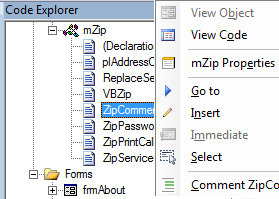
The Code Explorer shows all procedures in your project and allows you to move to the procedure you need to work on quickly using double-click selection. In addition it allows you to insert selected procedure into the current position in the code, comment code, select or remove procedures, tidy the code indentation, drag procedures to other modules (move) or projects (copy).
Code VBA menu
The presentation below follows the flow of the Code VBA menu which is added to the Visual Development Environment. The menu starts as item 'Code VBA' in the toolbar, the start of the truncated menu can be seen in the image below. Keyboard users will benefit from the ability to use the Alt-key combinations to select the appropriate menu item. As an example Alt-CPFB inserts the a block of code for a new function with returntype 'Boolean'.
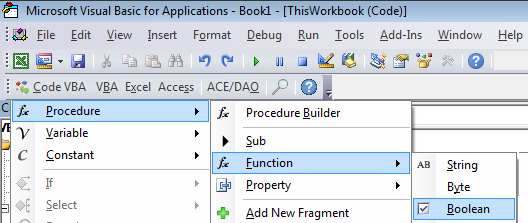
To the right of the 'Code VBA' are submenus which duplicate the main areas. This makes opening the correct menu one keystroke shorter: Alt-PFB
Note: If the toolbar does not appear, this may be caused by either Windows Explorer having excel open in the preview pane, or by an anti-virus program. You can try work around this by either closing the preview pane or by opening Excel before opening the file you you want to work on.
Declare procedures, variables and constants
- Create new procedure
- Add variables or procedure arguments
- Add a constant and select some value for it - filename, fieldname,...
Control structures
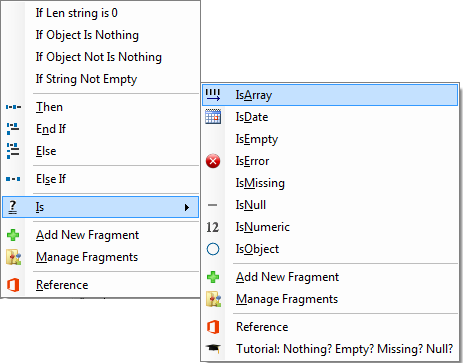
Inserting Code Blocks like If .. Then .. Else .. End If or For Each .. Next is nothing spectacular of course but as they occur so often will save you time. The Is submenu shows the built-in expressions such as IsNull and IsEmpty and contains a tutorial on when to use which, in case you forgot.
- Condition statements - If and Select
Is list - Repetition statements - Do and For loops
- GoTo and GoSub. GoTo shows a list of labels available in the current procedure, if any, where you can instruct to jump to.
Class and collection
- Create and use custom classes
- Add properties easily
- Use the built-in collection class: Add and Remove items, For Each
- Use With and automatically have the relevant variable selected for it
Dialogs / User Interaction /
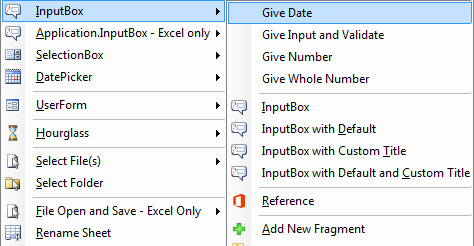
This lets you select from built-in and some extra custom dialogs. All relevant code and handling is inserted in one go.
- Many uses of message box with the appropriate Select Case statements automatically added
- InputBox extensions with code to validate if the value is of correct type
- New SelectionBox dialog for simple (or mult-) selection from a list (AKO InputBox)
- New DatePicker dialog for simple and user friendly selection of a date or begin- and end-date (AKO InputBox)
- File selection Open and Save
- Userform Builder - form code includes input validation
- All the important Excel built in dialogs, if applicable
Error handling
You want to handle errors professionally without having users confronted with unintelligible messages or, even worse, entering your code. The Code VBA error handlers can be inserted from the menu, or from the Code Explorer
- Basic Error Handling
- Add error handler code and error handling module
- Add line numbers to help determine where in a procedure an error occurs
- Insert Debug statements
Comment
This gives access to 2 distinct features
- The ability to quickly insert (and create and edit) comment blocks managed as fragments
- Comment code out efficiently
Name
In your code you will use names of objects regularly. The Name submenu provides easy access to many names without having to remember them or spend time looking them up or having to guess with the risk of making errors or typos.
- Select name of file or folder using the windows File/Folder selection dialog.
- In Excel, names of sheets or names ranges.
- In MS Access, pick up names of tables, queries or fields.
- Insert fields in SQL code
VBA procedures
When writing a program you use both built-in and custom - written by you - procedures. These again can be inserted using the Code VBA menu. Code VBA attempts to use variables already available in you procedure to fill in the arguments. Under Preferences you can customize the way procedures get inserted. As an example, you can set if you want to have explicit arguments used in the procedure call.
| Tip |
|---|
|
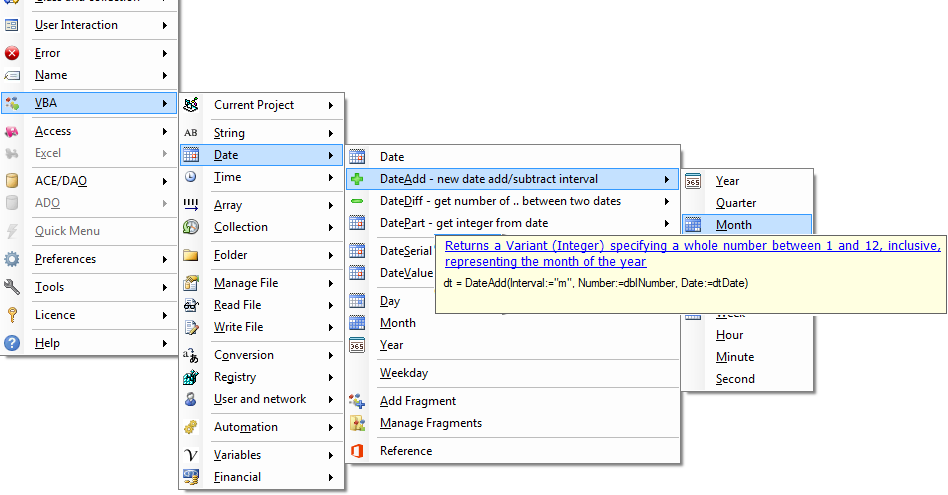
The built-in VBA procedures contain many useful functions. These have been organized in the menu so that they are easy to find:
- Current Project lists all procedures you defined in your project
- Strings shows all string handing procedures. Below Strings the menu Format displays all types of formatting such as FormatDate.
- Arrays gives you procedures used to working with arrays.
Add Fragments of code
The concept of managing a libary of code fragments or snippets is far from new. What is new is that fragments are fully merged in the menu system alongside the built-in vba code which makes it natural to chose built-in code or your own code fragments.
Reference and Tutorials, Custom Search
Admitted, we programmers spend a lot of time looking for sample code and explanations. The MSDN Office library is the most extensive resource. We sprinkled the menu with jumps to the relevant pages. In addition, you can use our Google based custom search which gives priority to selected on-line resources concerning VBA, Excel, MS Access and more.
Tools
- Print VBA code as HTML
- Show / Hide Code Explorer
Quick Menu
The Quick menu displays the most recent Code VBA menu or toolbar actions. By clicking the menu opens up to the last submenu allowing you to do the same or a similar or related action quicly. For example if you are acting on Excel Range or DAO fields, this gives you quick acces to subsequent actions.
Excel and Access
In addition to the Code VBA core system described above you can also use the parts below the Excel and Access menu which are specifically for use with these programs. An introduction can be found here: Excel VBA and Access VBA