Select Case from Enum Builder
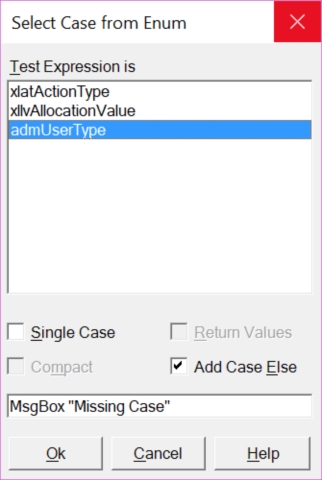
Select Case from Enum Builder creates a 'Select Case' statement from
enumerated constants.
The simplest variant (all checkboxes false results, example enum is
MailFormat) in
- Select Case
Case mfHTML
Case mfPlainText
Case mfRTF
End Select
- If we check ' Single Case ' the
result is
- Select Case
Case mfHTML, mfPlainText, mfRTF
End Select
- If we check ' Return values '
the result is
- Select Case
Case mfHTML
MyFunction = "HTML"
Case mfPlainText
MyFunction = "PlainText"
Case mfRTF
MyFunction = "RTF"
End Select
- (Very useful for getting a text representation of the Enum fast)
' Compact ' makes the
code use less space:
- Select Case
Case mfHTML: MyFunction = "HTML"
Case mfPlainText: MyFunction = "PlainText"
Case mfRTF: MyFunction = "RTF"
End Select
- Finally, Add Case Else
determines if a 'Else' case is added. The textbox Case
Else contains what line of code will be added in this case.
Controls:
Shows all enumerated types, built-in and custom made.
Select a variable or function to play the role of the expression to be
evaluated in the Select Case statement.
- If we check ' Single Case ' the
result is
- Select Case
Case mfHTML, mfPlainText, mfRTF
End Select
- If we check ' Return values '
the result is
- Select Case
Case mfHTML
MyFunction = "HTML"
Case mfPlainText
MyFunction = "PlainText"
Case mfRTF
MyFunction = "RTF"
End Select
- (Very useful for getting a text representation of the Enum fast)
' Compact ' makes the
code use less space:
- Select Case
Case mfHTML: MyFunction = "HTML"
Case mfPlainText: MyFunction = "PlainText"
Case mfRTF: MyFunction = "RTF"
End Select
Add Case
Else determines if a 'Else' case is added. The textbox Case
Else contains what line of code will be added in this case.
The textbox Case Else contains what line of code will
be added in this case.
Inserts the Select Case statement and closes the dialog.
Closes the dialog without inserting the Select Case statement..
Start this Help topic.